Power management for standing desks
By Mike Street
I appreciate this isn't the most thrilling of topics but, when researching myself, I struggled to find any kind of advice online.
We purchased 12 standing desks for the office. With the layout of our office, the plugs are only on 1 wall. We needed a way to run power to all the desks.
Our existing solution involved extension leads under the desks with cables tied to desk legs. However, with the desks standing, this wouldn't work. We also wanted to use the excuse to tidy up our under-desk cable management.
Layout
The office looked like this:
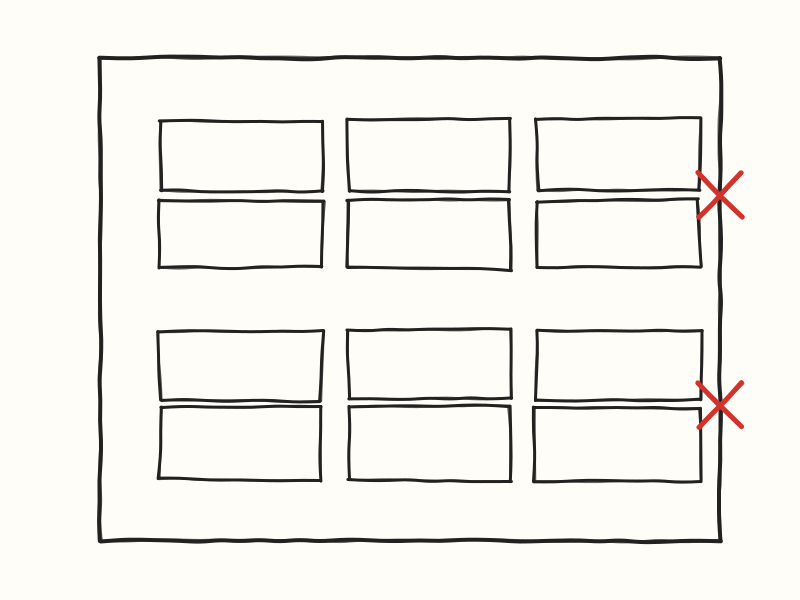
Each set of 6 desks, ideally, needs powering off 1 or 2 plugs each.
The Solution
The obvious answer would have been a load of extension leads plugged into each other, but I really didn't want to go down that route. Daisy-chaining standard extension leads is a well-known no-no, and even ignoring the risk, it ends up as a confusing tangle where nobody knows which lead powers what.
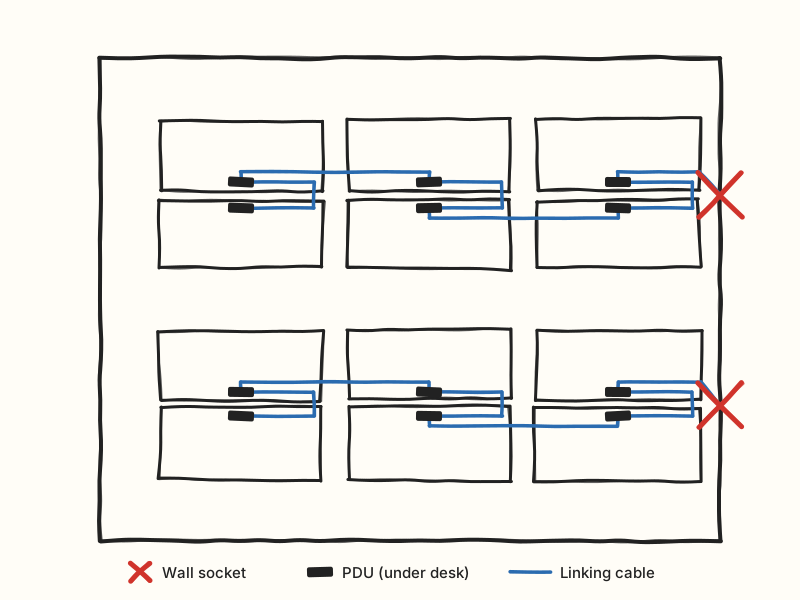
Instead, we went with PDUs (power distribution units). They are essentially the "official" way of chaining power along a run of equipment. We decided that Each desk would have a 3-socket PDU mounted underneath it, with a connecting cable running from one desk to the next.
One thing I didn't think about: I went for 3 sockets because I assumed desk, screen and computer. I forgot that people might want to plug extra peripherals like a fan or a speaker. Fortunately the desks have a USB-C port that some of the laptops can charge from, which freed up a socket for a few people.
The chain starts at the wall socket, goes to the first desk, then across to the desk opposite, back along to the next one and across again - zig-zagging down the block of 6.
Each bank of 6 desks is powered from a single wall socket, so there are just 2 plugs in use for the whole office.
Cable length
Our desks are 1.8m wide and the PDUs are small, so I needed enough cable to go from roughly the middle of one desk, along to a corner (to avoid having dangling cables in the middle of the desk), down to the floor, back up to the next desk and along to its middle. I wanted every link to be able to drop all the way to the floor, so there would definitely be enough slack whatever height each desk was at.
We went for 3m cables but, in hindsight, 2m would probably have done the job. It's always better to have a bit of spare cable thought
The end result is that all the cabling is tidied away under the desks, and the only thing you can see is a single black cable running between each desk.
Mounting the PDUs
To fix the PDUs to the underside of the desks, I 3D printed some brackets. I used a customisable model from Makerworld - Parametric Power Strip Holder and printed them in PETG rather than PLA, as it's a bit stronger.
Cost
Everything came from Data Comms Direct - the PDUs, the connecting cables and the leads to the wall - and it came to about £250 for all 12 desks.
A word on power draw
One thing worth considering is how much you're pulling through a single wall socket. Monitors, laptop chargers and the desk motors themselves all add up, and with 6 desks on one plug it's worth doing a rough sum (or checking with a plug-in power meter) for your own setup. I'm certainly no electrician, so if you're unsure, it's worth asking someone who is.
Wrapping up
It's not glamorous, but it's made a real difference - no more cables tied to desk legs, nothing to trip over and desks that can go up and down without anything getting tugged. If you've tackled the same problem a different way, I'd love to hear how.
